Dates are dates, amounts are numbers and reference numbers stay text with their leading zeros, whichever format you export.
Supported file layouts
PDF conversion supports searchable text with a YYYY-MM-DD, Description and signed Amount table. Scanned PDFs, photos and other PDF layouts are read with AI extraction once you sign in. Investment records, QIF split transactions and multi-split IIF transactions are rejected with an explanation.
The preview shows up to ten transaction rows and grouped totals. Statement opening and running balances are not inferred or reconciled.
Why use this bank statement converter
Statements are written for reading, not for importing. Copy a statement out of a PDF viewer and you get text that looks like numbers, dates that refuse to sort, and page headers and subtotals mixed in with the transactions. The bank statement converter keeps only the transaction rows, types every value, and writes it to the format your next step needs, so one upload can feed a spreadsheet, an accounting import or a bank feed.
The upload box never changes. Choose a tool above and only the instructions and output format switch.
Every job shows transaction totals grouped by account and currency. Compare them with the source before relying on the export.
Scanned PDFs, photos and unknown layouts are read with AI extraction and checked against the balances printed on the statement; mismatches are flagged, never silently fixed.
Up to 20 files per batch, processed into one export with the source filename kept on every row.
Uploads are validated, hashed with SHA-256 and deleted once the job record exists. The original never leaves your device in editable form.
How the bank statement converter works
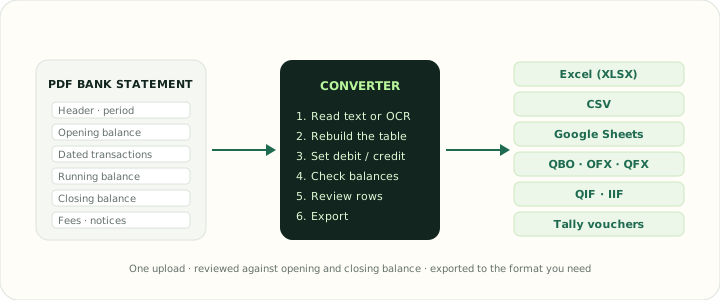
- 1Choose a tool and uploadPick the output you need from the tools above, then drop the statements into the box. Scanned PDFs, photos and other layouts are read with AI extraction once you sign in.
- 2Review the transactionsReview a preview of the first ten transactions and the grouped totals. The conversion does not edit extracted rows.
- 3ExportDownload the workbook, CSV or accounting file and keep the PDF as the authoritative record. The export is a working copy for review and reconciliation.
What the converter keeps from the statement
A useful conversion carries the meaning of every line, not just its visible text. These are the fields the converter preserves and the checks it applies to each one.
| Field | What is preserved | Check applied |
|---|---|---|
| Transaction dates | Parsed dates as real date values (PDF tables require YYYY-MM-DD) | Dates are validated strictly; ambiguous CSV dates require a selected date order |
| Descriptions | Description and memo text from each parsed row | Unrecognized PDF rows are rejected rather than silently skipped |
| Debits and credits | Debit and Credit derived from the signed Amount, which is also kept | Compare totals with the original statement |
| Balance | The source Balance value when the supported table has one | Running balances are not inferred |
| Source file | Uploaded filename on every row | PDF page numbers are not extracted |
Bank statement converter outputs by destination
The most common job is turning a bank statement PDF to Excel, but the same extraction feeds every tool, so a statement reviewed once can be exported to whichever format the next step needs. The All tools directory lists all 35.
Excel, CSV and Google Sheets exports have one header row, one transaction per line, ISO dates and plain numeric amounts, so filters, SUMIFS and pivot tables work immediately.
QBO, QFX and OFX exports require correct account, institution and balance details. Provide verified values and test the file with the destination application.
QIF and IIF exports use the record structure those programs expect, including balanced TRNS and SPL lines for QuickBooks Desktop.
The Tally export requires existing bank and counterparty ledger names. It writes balanced journal entries from the parsed signed amounts.
File handling in the bank statement converter
A statement reveals account identifiers, balances, counterparties and spending habits, so the handling rules are strict and visible. Each request is checked for file type and size. The job stores file metadata and a SHA-256 checksum. Source files are deleted after processing; the generated export is retained for up to 24 hours. The original document is not stored. Browser downloads land in your own download folder, so apply the same care to the exported file as to the original.
If you are reading statements for the first time, the consumer regulator's guidance on what a statement contains and how to dispute an error is a good companion: see Ask CFPB for US accounts, and the bank statement example page here for an annotated sample.
✓ File type validation✓ 50 MB per file, 20 files per job✓ SHA-256 checksum recorded✓ Temporary upload removed after the job
Bank statement converter FAQ
Which files does the bank statement converter accept?
PDF bank statements for the statement tools, and CSV, IIF, OFX, QBO, QFX and QIF files for the format tools. Each upload can be up to 50 MB and a job can hold 20 files.
Can the bank statement converter process scanned statements?
Yes, with a free account. Scanned PDFs and photos (JPG or PNG) are read with AI extraction once you sign in, and free accounts include 15 AI pages a month. Balances are checked against the statement and flagged when they do not add up.
Is my statement stored?
No. The upload is checked for type and size, a SHA-256 checksum is recorded against the job, and the temporary file is deleted from the server once the job has been created. The original stays on your device.
How do I know the conversion is complete?
A transaction preview and grouped totals are shown before export. The converter does not infer opening or running balances; compare the result with the original file.
Which output should I choose?
Excel or Google Sheets for review and analysis, CSV for accounting imports that accept a table, QBO or OFX when your software expects a bank feed, and Tally for voucher imports. Pick the tool above; the upload box stays the same.
Does the bank statement converter cost anything?
Creating a job, reviewing the extracted transactions and downloading the result is free, with nothing to install.