Account type, currency and a masked account number are entered once during review and written to the header.
Supported input and export details
CSV input requires Date and Amount columns, or Date with both Debit and Credit columns. Ambiguous dates require the date order to be selected.
This export requires an account ID, currency, actual closing balance and date; bank feeds also require a routing ID for checking or savings accounts. These values are not guessed, and destination compatibility is not guaranteed.
Set required export details in “Account and export details” before converting. The preview shows up to ten transactions and totals by account and currency. Opening or running balances are not inferred, and previewed transactions cannot be edited here. Download links expire after 24 hours.
Why convert CSV files to OFX
Software that imports Open Financial Exchange files often refuses CSV, or accepts it only through a fragile column-mapping dialog. Writing a proper OFX gives that software the account block, currency and per-transaction identifiers it expects, so the import behaves like a download from the bank rather than a manual paste.
A FITID is generated from each row's date, amount and description, so repeated conversions yield repeated identifiers.
Ambiguous dates such as 03/04/2026 are interpreted according to the locale you choose, and the interpretation is shown before export.
Signed Amount, Debit and Credit, and Money In and Money Out layouts are all read correctly.
If the CSV has a balance column, the final value is written to LEDGERBAL.
The CSV is validated, hashed for the record and wiped from the server once the job is written.
Who converts CSV to OFX
Banks that only export CSV can still be imported into software that expects OFX.
A spreadsheet export from a payment processor becomes an import the accounting package accepts.
Several CSV exports are converted with consistent account details so they import cleanly side by side.
A known CSV can be turned into valid OFX for testing an import routine.
CSV to OFX: how each field is mapped
Everything OFX needs that a CSV lacks is supplied during review or generated. The table shows each field's source and its element in the file.
| Field | In CSV | In OFX |
|---|---|---|
| Date | One text column; ISO format recommended | DTPOSTED in YYYYMMDD form |
| Description | Free-text column, quoted when it contains commas | NAME and MEMO elements |
| Amount | Signed Amount column, or Debit and Credit columns | Signed TRNAMT |
| Balance | Optional Balance column | LEDGERBAL block at statement close |
| Reference | Optional Reference column | FITID unique ID plus CHECKNUM |
| Account | Not stored unless added as a column | BANKACCTFROM with routing and account IDs |
| Currency | Not stored unless added as a column | CURDEF element |
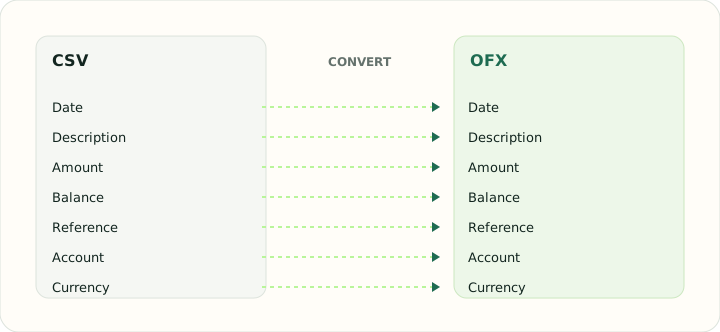
Converting CSV to OFX in practice
Giving a plain CSV the structure OFX requires
OFX requires account and currency information not guaranteed in a CSV. Enter the actual account ID, currency, account type, closing balance and its date; bank accounts also require routing details. Identifiers are carried from source rows or generated, but the receiving application's duplicate behavior can vary.
CSV input requires Date and Amount, or Date plus Debit and Credit columns. Ambiguous dates require an explicit date order; Money In / Money Out-only layouts are not automatically mapped.
After converting, check that:
- The date locale was interpreted correctly for ambiguous dates
- TRNAMT signs match the CSV's debit and credit columns
- Importing the file twice does not duplicate transactions
How to convert CSV to OFX in three steps
- 1Upload the CSVAdd the export. Headers are detected and the first rows are shown so you can confirm the columns.
- 2Enter account detailsChoose the account type, currency and date locale. Review the signed amounts.
- 3Download the OFXImport it into your software. Because identifiers are deterministic, a second import of the same file is recognised.
About CSV and OFX
A CSV export has whatever columns the exporting system chose, in whatever date order its locale uses. The converter's first job is to work out which column is which and to confirm the date convention.
OFX wraps transactions in a statement block with account and currency details, and gives each transaction a unique identifier. Those are the elements that make duplicate detection possible in the importing program.
Specifications and vendor help for CSV and OFX: RFC 4180, the CSV specification · Financial Data Exchange, maintainer of the OFX standard
Questions about OFX conversion
Does the OFX need my real account number?
No. A masked or placeholder value is accepted for manual imports; you confirm the account inside your software on first import.
How are duplicates prevented?
Identifiers are derived from the transaction data, so importing the same converted file twice is detected by the destination.
Can I convert a credit card CSV?
Yes. Choose credit card as the account type so amounts are signed the way card imports expect.
Which OFX version is written?
SGML-style OFX 1 by default for the widest compatibility, with OFX 2 XML available in review.
Is this csv to ofx converter online free?
Yes. It runs in the browser and downloading the OFX file is free.
Can I convert CSV to OFX in Excel instead?
Excel has no OFX export. Save the sheet as CSV, upload it here, and the converter writes the OFX file with the identifiers Excel could not generate.
Can I convert an Excel file to OFX?
Save the worksheet as CSV first, then upload it here. The column mapping and account details are the same.