Older OFX 1 files with unclosed tags and OFX 2 XML are parsed the same way.
Supported input and export details
Bank and credit-card transactions are supported. Investment downloads and unsupported statement structures are rejected.
Set required export details in “Account and export details” before converting. The preview shows up to ten transactions and totals by account and currency. Opening or running balances are not inferred, and previewed transactions cannot be edited here. Download links expire after 24 hours.
Why convert OFX files to CSV
OFX is written for software, and a spreadsheet cannot read its tagged structure. Converting to CSV extracts the transaction blocks into rows, normalises the timestamps into plain dates, and keeps the account identifiers and the transaction IDs as columns so the data can be filtered, merged and de-duplicated in a spreadsheet.
DTPOSTED values with time and zone suffixes become plain YYYY-MM-DD dates.
Bank ID, account ID, account type and currency are repeated on every row so merged files stay filterable.
The bank's transaction identifier is kept in its own column for de-duplication.
TRNTYPE values such as POS and XFER are written as readable words.
The OFX file is removed from the server once the job exists; a checksum is all that is retained.
Who converts OFX to CSV
Bank downloads land in the ledger workbook without retyping.
Transaction data from several accounts merges into one table with account columns to group by.
A client's download can be reviewed in Excel or Sheets.
OFX test files become readable tables during integration work.
OFX to CSV: how each field is mapped
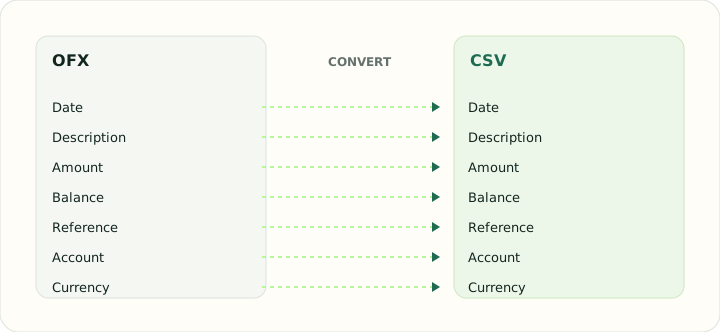
OFX elements map directly onto CSV columns. The table shows each element and the column it becomes.
| Field | In OFX | In CSV |
|---|---|---|
| Date | DTPOSTED in YYYYMMDD form | One text column; ISO format recommended |
| Description | NAME and MEMO elements | Free-text column, quoted when it contains commas |
| Amount | Signed TRNAMT | Signed Amount column, or Debit and Credit columns |
| Balance | LEDGERBAL block at statement close | Optional Balance column |
| Reference | FITID unique ID plus CHECKNUM | Optional Reference column |
| Account | BANKACCTFROM with routing and account IDs | Not stored unless added as a column |
| Currency | CURDEF element | Not stored unless added as a column |
Converting OFX to CSV in practice
Reading tagged OFX transactions into a flat table
OFX comes in two dialects: the older SGML style with unclosed tags, and OFX 2 as well-formed XML. The converter reads both and pulls the same fields from each STMTTRN block: DTPOSTED, TRNAMT, NAME, MEMO, FITID, CHECKNUM and TRNTYPE. Dates are written as YYYY-MM-DD, and the time-zone suffix that some banks append to DTPOSTED is dropped after the date has been calculated in the statement's own zone.
Account details from the header — bank ID, account ID, account type and currency — are repeated on every row as extra columns so a CSV built from several OFX files can still be filtered by account. The FITID is kept in its own column because it is the only reliable key for de-duplicating downloads.
After converting, check that:
- Row count matches the number of STMTTRN blocks
- Dates were converted from the OFX timestamp without a day shift
- FITID and account columns are present on every row
How to convert OFX to CSV in three steps
- 1Upload the OFXAdd one or more downloads. Files from different accounts are fine; the account columns keep them apart.
- 2Check the summaryEach file shows its period, transaction count and ledger balance before export.
- 3Download the CSVOpen it in a spreadsheet. Sort by the account column if several downloads were combined.
About OFX and CSV
An OFX download packages a statement as tagged elements: an account block, a date range, transaction blocks with identifiers, and a ledger balance. Banks vary in which optional elements they fill.
CSV keeps only what fits in a flat table, so the converter copies the account and balance context into columns rather than dropping it.
Specifications and vendor help for OFX and CSV: Financial Data Exchange, maintainer of the OFX standard · RFC 4180, the CSV specification
Questions about CSV conversion
Does the CSV keep the bank's transaction IDs?
Yes, in a FITID column, which is the reliable key for removing duplicates across downloads.
Why do dates lose their time component?
Most OFX timestamps are midnight in the bank's zone; the date is what matters for bookkeeping, so only the date is written.
Can I combine several OFX files?
Yes. Up to twenty files go into one CSV with account columns to distinguish them.
Are credit card downloads supported?
Yes. Card statements use the same transaction blocks and are handled identically.
Is this ofx to csv converter online free?
Yes. It runs in the browser and downloading the CSV is free.
How do I convert an OFX file to CSV that Excel opens cleanly?
Upload the OFX, check the summary, and download the CSV. Dates are written as YYYY-MM-DD and amounts as plain numbers, so Excel types them correctly.
Do I need Python to convert OFX to CSV?
No. Scripts that parse OFX to CSV in Python exist, but this converter does the same job in the browser without code, including both OFX dialects.