Each record gets a FITID derived from its date, amount and payee.
Supported input and export details
QIF split transactions are not supported. Ambiguous dates require the date order to be selected.
This export requires an account ID, currency, actual closing balance and date; bank feeds also require a valid numeric institution ID and a routing ID for checking or savings accounts. These values are not guessed, and destination compatibility is not guaranteed.
Set required export details in “Account and export details” before converting. The preview shows up to ten transactions and totals by account and currency. Opening or running balances are not inferred, and previewed transactions cannot be edited here. Download links expire after 24 hours.
Why use this QIF to QBO converter
The output requires a valid numeric institution ID, account ID, currency, account type, actual closing balance and its date; bank accounts also need a routing ID. This converter cannot guarantee QuickBooks acceptance or duplicate detection.
T to TRNAMT, N to CHECKNUM, M to MEMO, P to NAME.
L lines are appended to MEMO since QBO has no category field.
The parsed dates are listed next to the raw D lines so a swapped day and month is caught before export.
The header QuickBooks validates is added.
The uploaded QIF is hashed for the job record and then wiped from the server.
Who converts QIF to QBO
Exported history imports as a bank feed.
Clients' QIF exports are served in QuickBooks.
Apps that export QIF can feed QuickBooks.
QuickBooks Desktop imports the same QBO file through Web Connect.
QIF to QBO: how each field is mapped
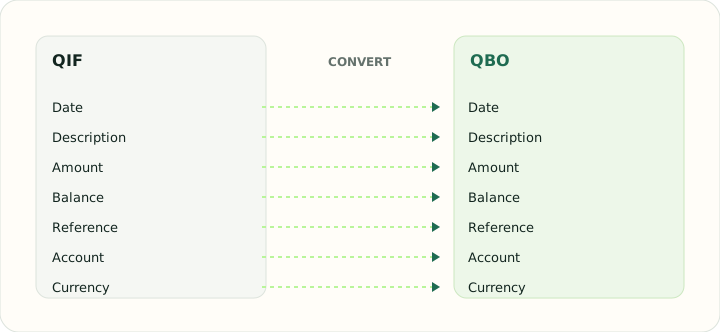
QIF has no identifiers or account details; both are supplied during conversion. The table shows each code's destination.
| Field | In QIF | In QBO |
|---|---|---|
| Date | D line, locale-dependent format | Posting date as a DTPOSTED timestamp |
| Description | P (payee) and M (memo) lines | Payee in NAME, detail in MEMO |
| Amount | T line, signed | TRNAMT, negative for money out |
| Balance | Not stored | Closing balance in LEDGERBAL |
| Reference | N line for check number | Bank identifier FITID; CHECKNUM when present |
| Account | !Account header block | Account block plus the INTU.BID number QuickBooks validates |
| Currency | Not stored; account currency applies | Three-letter code in CURDEF |
Converting QIF to QBO in practice
Upgrading a QIF export into a QuickBooks bank feed
This exporter requires a valid numeric institution ID, account ID, currency, account type, actual closing balance and date; bank accounts also require routing details. It will not invent destination metadata or guarantee QuickBooks accepts the output.
QIF split transactions are rejected. Source identifiers are included when present or generated, but duplicate handling varies; check the destination register before importing overlapping periods.
After converting, check that:
- Valid institution and account details match the target
- The input contains no split transactions
- Test the output and duplicate handling before a large import
How to convert QIF to QBO in three steps
- 1Upload the QIFAdd the legacy export that QuickBooks needs to receive.
- 2Confirm date order and account typeCheck interpreted dates and choose the QuickBooks account type.
- 3Download and upload to QuickBooksUse Upload transactions or Web Connect and review the matches.
About QIF and QBO
QIF is a legacy plain-text format with letter-coded fields, no identifiers and locale-dependent dates.
QBO is QuickBooks' Web Connect format, requiring an institution block, a supported account type and a FITID per transaction.
Specifications and vendor help for QIF and QBO: Quicken support · QuickBooks support
Questions about QBO conversion
Will uploading twice create duplicates?
The file does not guarantee duplicate detection. Check the destination register before repeating an import.
What about transactions already entered manually in QuickBooks?
They are not detected; review the register for the period first.
Are categories imported?
A parsed category value is included in the memo when available.
Are QIF splits supported?
No. Split records are rejected before conversion.
Is the qif to qbo converter free?
Yes. Converting the QIF and downloading the QBO for QuickBooks is free, with no software to install.