The posting date lands in a date cell, the amount in a numeric cell, and FITID and check numbers in text cells that Excel leaves alone.
Why use this QBO to Excel converter
A QBO file is built for QuickBooks' importer, not for people. Its transactions sit inside tagged blocks that a spreadsheet shows as a single column of markup. Converting to a workbook puts each transaction on its own row with real date cells and numeric amounts, adds the account details from the header, and includes a summary sheet so the download can be reviewed before it is uploaded to QuickBooks or shared with someone who does not use it.
Signed amounts are written as separate Debit and Credit columns as well as a signed Amount, so either reconciliation style works.
Period, account ID, ledger balance and totals of money in and out are on a second sheet without any formulas to write.
Account ID, type and currency from the QBO header are repeated per row, so several downloads can share one workbook.
TRNTYPE values such as POS, XFER and FEE are written as readable words.
The QBO is validated, hashed with SHA-256 and deleted from the server once the job exists.
Who converts QBO to Excel
A download can be checked in Excel before it touches the QuickBooks ledger, and the workbook filed with the reconciliation.
A client's QBO file becomes a workbook they can read and annotate.
Transactions from several accounts merge into one reporting workbook with account columns to group by.
A download that QuickBooks rejected can be inspected row by row to find the bad line.
QBO to Excel: how each field is mapped
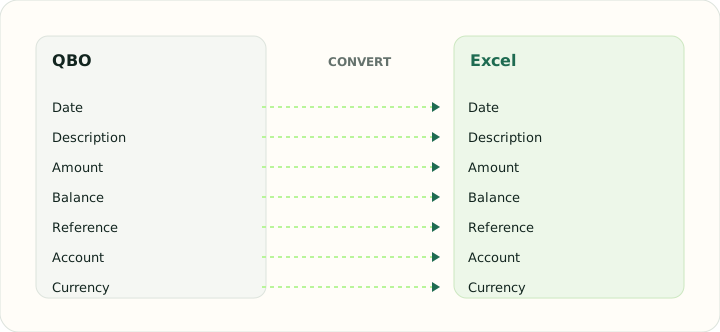
Every QBO element has a natural cell type in Excel. The table shows the element, its origin in the file and how it is typed in the workbook.
| Field | In QBO | In Excel |
|---|---|---|
| Date | Posting date as a DTPOSTED timestamp | Typed date cells that sort and filter correctly |
| Description | Payee in NAME, detail in MEMO | Text cells; wrapped descriptions stay in one cell |
| Amount | TRNAMT, negative for money out | Numeric Debit, Credit and signed Amount cells |
| Balance | Closing balance in LEDGERBAL | Numeric running balance column |
| Reference | Bank identifier FITID; CHECKNUM when present | Text cells so leading zeros survive |
| Account | Account block plus the INTU.BID number QuickBooks validates | Sheet header or a dedicated column |
| Currency | Three-letter code in CURDEF | Number format applied per column |
Converting QBO to Excel in practice
Reading a QuickBooks download outside QuickBooks
QBO is OFX with QuickBooks institution metadata, so a workbook built from it has to do two things: parse the tagged transaction blocks into columns, and keep the header context — account ID, account type, currency, statement period and ledger balance — where a reader can see it. The converter puts that context in columns on every row and repeats it on a summary sheet with totals, which turns a file meant for an importer into something a person can reconcile.
Two details matter for Excel. FITID values are long and numeric-looking, so they are written as text to stop Excel turning them into scientific notation. And DTPOSTED timestamps sometimes carry a time-zone suffix; the date is calculated in the statement's own zone before it is written, so a transaction posted late in the evening does not slip to the next day.
After converting, check that:
- FITID cells are text, not numbers
- The summary sheet's net movement equals the transaction sheet's total
- Dates fall inside the DTSTART to DTEND period
How to convert QBO to Excel in three steps
- 1Upload the QBO downloadsAdd one or more files. Different accounts are fine; the account columns keep them apart.
- 2Check the summaryTransaction count, period and ledger balance are shown for each file before export.
- 3Download the workbookOpen it in Excel, LibreOffice or Google Sheets. The summary sheet reconciles to the transaction sheet.
About QBO and Excel
QBO is QuickBooks' Web Connect format: an OFX statement wrapped with an institution identifier, an account block and transactions that each carry a posting date, a signed amount, a name, a memo and a unique FITID.
An XLSX workbook stores typed cells on named sheets, which is why dates sort, amounts sum and identifiers survive without any clean-up after the conversion.
Specifications and vendor help for QBO and Excel: QuickBooks support · Microsoft Excel support
Questions about Excel conversion
Does the workbook keep the QuickBooks transaction identifiers?
Yes. FITID is written to a text column, so it can be used to de-duplicate against other downloads or a QuickBooks export.
Do credit card QBO downloads convert too?
Yes. Card downloads use the same transaction blocks; purchases and payments land in the Debit and Credit columns.
Can I combine several downloads in one workbook?
Yes. Up to 20 files go into one job; the account columns identify each row's source.
Will the summary sheet reconcile?
Money in minus money out on the summary equals the net movement on the transaction sheet, and the ledger balance from the file is printed beside it.
Can I just open a QBO in Excel instead of using a qbo to excel converter?
Excel will open the file as one column of tags. The converter parses the blocks into columns and types every cell, which is what makes the workbook usable.
How do I convert QBO to Excel for a period QuickBooks already imported?
Convert the same download; the workbook is a working copy and does not affect QuickBooks. Use the FITID column to match rows against the register if needed.