Each transaction becomes a D, T, P, M and N record closed with a caret, under the account-type header you choose.
Why convert Bank Statement files to QIF
Older Quicken releases and many budgeting apps import QIF and nothing newer, and some banks provide statements only as PDF. Rebuilding the statement as QIF gives that software a file it can read, with the payee, amount, date and check number of every line. Because QIF has no balances or identifiers, the statement's opening and closing balance are used during review to prove the extraction before the file is written.
Deposits are written as positive T values and withdrawals, checks and fees as negative, following the statement's own grouping.
A check number found in the description is moved to the N line where Quicken shows it.
QIF has no locale marker, so the date convention of the importing program is selected in review.
Opening balance plus the extracted lines must equal the closing balance before the QIF is offered.
The PDF is validated, hashed with SHA-256 and deleted from the server once the job exists.
Who converts Bank Statement to QIF
Releases without Web Connect still take QIF, so a PDF statement can be imported.
Apps that read QIF import the statement without a bank connection.
Accounts that only issue PDF statements can still be tracked in QIF-based software.
A plain-text QIF copy of each statement stays readable without any program.
Bank Statement to QIF: how each field is mapped
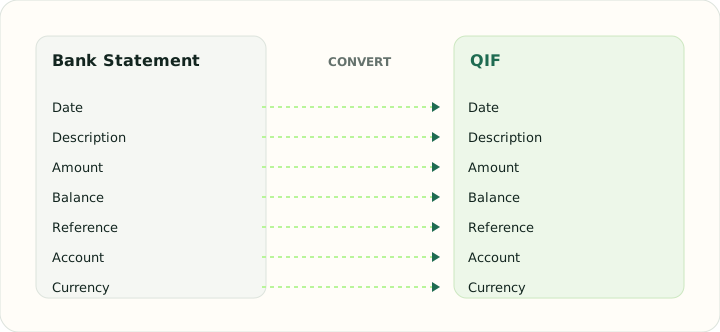
QIF stores far less than a statement prints. The table shows which statement fields survive, where they go and what is dropped.
| Field | In Bank Statement | In QIF |
|---|---|---|
| Date | Transaction and posting dates printed on each line | D line, locale-dependent format |
| Description | Merchant or payee text, often wrapped over two lines | P (payee) and M (memo) lines |
| Amount | Separate debit and credit columns, or a signed amount | T line, signed |
| Balance | Running balance after each line on most statements | Not stored |
| Reference | Check numbers and bank references inside the description | N line for check number |
| Account | Masked account number and statement period in the header | !Account header block |
| Currency | Statement currency in the header | Not stored; account currency applies |
Converting Bank Statement to QIF in practice
Fitting a printed statement into a format that stores less
QIF is the smallest of the Quicken formats: a date, an amount, a payee, a memo, a check number and a category per record. A statement carries more — period, opening and closing balance, section subtotals, running balance — and none of it fits. The converter uses that extra information during review to prove the extraction (opening balance plus the lines equals the closing balance) and then writes only the record fields, so the QIF is correct even though it cannot show why.
The sign of each amount comes from the statement section rather than from a signed number, because many statements print separate Deposit and Withdrawal columns. Check numbers found in descriptions are moved to the N line. Dates are written in the order the importing program expects, which is selected in review, since QIF has no way to say which convention it uses.
After converting, check that:
- Opening balance plus the T amounts equals the closing balance
- Deposits are positive and withdrawals negative
- The !Type header matches the account being imported
How to convert Bank Statement to QIF in three steps
- 1Upload the statement PDFsAdd one statement or a monthly batch. Native PDFs from online banking convert more reliably than scans.
- 2Confirm account type, date order and balancesChoose Bank or CCard, pick the date convention the importing program uses, and check that the balance chain closes.
- 3Download the QIFImport it; test with one month first, because QIF has no duplicate detection.
About Bank Statement and QIF
A statement PDF is laid out for reading: sections with subtotals, wrapped descriptions and a balance after each line. The converter reads the sections to fix the sign of each amount and drops the summary lines.
QIF is a letter-coded plain-text format with no identifiers, no balances and no locale marker. It is still the most widely read import format among budgeting tools and older Quicken releases.
Specifications and vendor help for Bank Statement and QIF: Quicken support
Questions about QIF conversion
Which account-type header will the QIF use?
Bank for checking and savings statements, CCard for credit card statements; you confirm it in review.
What happens to the running balance?
QIF cannot store it. It is used during review to check the extraction and then left out of the file.
Can I convert scanned statements?
Yes. Image-only statements go through OCR and uncertain digits are flagged for review.
Will importing the same month twice duplicate transactions?
Possibly. QIF has no identifiers, so import each period once.
Is this the same as a bank statement to QIF converter for Quicken?
Yes. The output follows the QIF structure Quicken has read since its early releases and also imports into budgeting apps that accept QIF.