FREE ONLINE CONVERTER · TIER 2

IIF to CSV converter

Turn IIF files into clean, usable CSV data. Upload your files securely and create a conversion job in seconds.

BUILT FOR ACCURACY

How to convert IIF to CSV

  1. 1Upload your filesAdd one file or a monthly batch.
  2. 2Review the dataCheck normalized dates, descriptions and amounts.
  3. 3Export to CSVDownload a file ready for your workflow.

COMPLETE CONVERSION GUIDE

How the IIF to CSV converter works

This guide explains how to convert IIF to CSV, what happens to transaction data during the process, how to review the result, and how to avoid common import problems.

IIF to CSV: format-specific considerations

IIF is a tab-delimited import and export format associated with QuickBooks Desktop. IIF uses record headers and transaction lines rather than a simple flat table. Account names, transaction types, and balanced split lines require careful mapping.

CSV is a plain-text table format in which records are separated by lines and fields by delimiters such as commas. CSV is widely supported but does not preserve formulas, styling, account metadata, or a universal financial schema. Delimiter, encoding, date, and decimal conventions must be checked.

IIF uses record headers and transaction lines rather than a simple flat table. Account names, transaction types, and balanced split lines require careful mapping. This conversion creates a portable transaction table for spreadsheets, databases, reconciliation, and custom analysis.

What is a IIF to CSV converter?

A IIF to CSV converter changes financial information from one file structure into another while preserving the details that make the data useful. Those details normally include transaction dates, descriptions, reference numbers, debit or credit values, currency, and the running balance. A dependable conversion is more than renaming a file extension. The source must be read, each record must be interpreted, and the information must be mapped to fields accepted by the destination format. BankStatement2PDF creates a conversion job, records the source metadata, and prepares the file for structured extraction and review.

People use this workflow when a bank, accounting platform, bookkeeper, or reporting system provides IIF but the next step requires CSV. It can replace repetitive copy and paste, reduce typing mistakes, and create a consistent archive across accounts. The converter is designed for monthly bookkeeping, historical data migration, reconciliation preparation, audit support, expense analysis, and importing transactions into another financial tool. Always review a converted file before treating it as a final accounting record, especially when the source was scanned or created by an unfamiliar system.

How to convert IIF to CSV

1. Select the correct source files

Choose files that genuinely contain IIF data and avoid password-protected documents unless you have removed the password locally. When several files represent consecutive months, upload them in one batch so that the review process can identify overlaps and gaps. Clear source data produces a more reliable IIF to CSV conversion. If a statement is a scan, check that dates, descriptions, and amounts are sharp enough to read. Cropped pages, handwritten notes, and low-contrast images can make extraction less predictable.

2. Create and process the conversion job

After upload, the service validates file size and extension, calculates a SHA-256 checksum, and creates a job identifier. A processing worker can then parse native text or apply OCR to image-based pages. The extracted records are normalized into a neutral transaction model before CSV is produced. Normalization is important because banks and finance programs use different labels and conventions. One system may represent withdrawals as negative amounts, while another separates debit and credit columns. A neutral model prevents those differences from silently changing the meaning of a transaction.

3. Review before exporting

Review the opening and closing balances, the number of transactions, the date range, and several high-value entries. Look for duplicate rows and confirm that debit and credit directions are correct. When the source contains a running balance, compare calculated balances with the original file. A review step is particularly important for OCR because similar characters can be confused. Once the records look correct, export the job as CSV and test it with a small or reversible import before adding it to a live accounting ledger.

Data preserved during IIF to CSV conversion

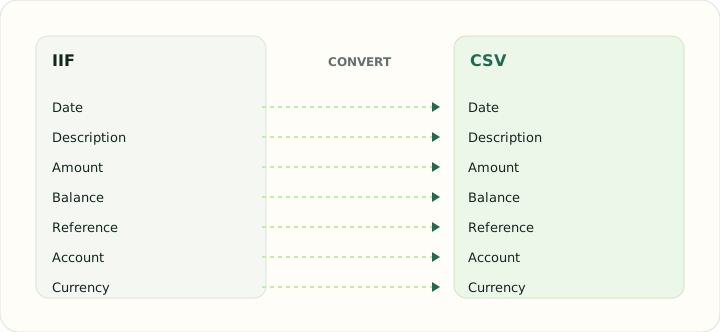
The converter aims to preserve the transaction date, posting date when available, original description, cleaned description, reference or check number, debit, credit, signed amount, currency, and running balance. It may also retain the source filename and page number so that a reviewer can trace a row back to its origin. Not every IIF file includes all of these fields, and not every CSV specification can store them in the same way. When a destination has fewer fields, essential accounting values take priority and supplementary information can be included in a memo or description field.

Date interpretation deserves special care. A value such as 04/05 can mean April 5 or May 4 depending on the country and source. The surrounding statement period, currency, bank location, and neighboring transactions can help resolve the format. Currency should never be guessed merely from a symbol when multiple currencies share it. The original source remains the authority. BankStatement2PDF's review-oriented workflow is intended to make uncertain values visible rather than hiding them behind an automatic download.

When should you use this IIF to CSV converter?

Use the tool when your existing file opens correctly but cannot be imported into the application where you need to work. Common examples include moving historical transactions to a new bookkeeping system, sending a spreadsheet-friendly version to an accountant, creating a readable archive, consolidating records from different banks, or preparing data for analysis. A focused IIF to CSV page helps you choose the route without navigating through unrelated options, and it provides instructions that match the exact source and destination.

Conversion should not be used to alter evidence, fabricate transactions, or replace the official record supplied by a financial institution. A generated CSV file is a working copy. Keep the original IIF file according to your legal, tax, audit, and organizational retention requirements. If the converted data will support a tax filing or regulated report, reconcile totals with the original and have an appropriately qualified person review the result.

Accuracy checks for the converted CSV file

Begin with record count and statement period. The first and last dates should match the source, allowing for pending transactions or non-transaction summary rows that should not be imported. Next, confirm the sign convention: income, deposits, withdrawals, fees, reversals, and refunds must remain on the correct side. Add the opening balance to the net movement and compare it with the closing balance. If they do not agree, look for missing pages, duplicated headers interpreted as rows, foreign-currency sections, or transactions that wrap across lines.

Descriptions may be normalized for readability, but the original text should remain available when traceability matters. Reference numbers and check numbers should not be converted to scientific notation or stripped of leading zeros. Large identifiers are often safer as text. For CSV destinations that impose strict schemas, validate required headers, character encoding, decimal separators, account identifiers, and date formats. Import a small sample first whenever the destination platform cannot easily undo a batch.

Privacy and safe file handling

Financial files can reveal account identifiers, balances, counterparties, addresses, and spending habits. Use a converter only on a device and network you trust. This local application accepts uploads over the local server, calculates a checksum for integrity and duplicate detection, stores job metadata in PostgreSQL, and removes the temporary uploaded file after the request finishes. The database is not intended to store the raw bank document. A production deployment should also use TLS, encrypted storage for any short-lived processing object, narrowly scoped service credentials, access logging, automatic expiry, and a tested deletion routine.

Do not upload files you are not authorized to process. Redact unnecessary personal information when possible, and restrict access to exported CSV files just as carefully as the originals. Browser downloads may remain in a default folder or cloud-synchronized directory, so move or delete them according to your retention policy. Privacy is a workflow, not a single checkbox: secure upload, isolated processing, limited metadata, short retention, controlled download, and verified deletion all matter.

Troubleshooting IIF to CSV conversion

If an upload is rejected, confirm that the filename uses a supported extension and that each file is no larger than 25 MB. If the result is empty, open the source and verify that it contains transaction records rather than only a summary, cover page, or image that is too faint for OCR. If dates appear in the wrong order, check the source locale. If amounts are reversed, inspect whether the original uses separate debit and credit columns or a signed amount. Password protection, damaged files, unusual encodings, and proprietary variants can also prevent a complete conversion.

If an import into the destination fails, read the destination application's error message before converting again. The CSV file may require a specific account type, date range, currency, header name, encoding, or version. Duplicate detection in the destination may also reject transactions that were imported previously. Keep the job ID and source checksum when investigating a problem; together they help distinguish a new upload from a repeated file without retaining the sensitive source document.

Frequently asked questions

Does converting IIF change the original file?

No. A conversion reads the submitted source and creates a separate CSV result. The original file on your device is not edited. Keep it as the authoritative record and compare totals before using the new file.

Can I convert several IIF files at once?

Yes. A job can accept up to 20 files, subject to the per-file size limit. Batch conversion is useful for consecutive statements, but review the date ranges for duplicates and missing months.

Is the converted CSV file ready to import immediately?

It may be, but review is strongly recommended. Destination applications have different account settings and duplicate rules. Validate a small sample before committing a large import.

Will every field look identical after conversion?

No format pair is perfectly symmetrical. The converter preserves core transaction meaning, while unsupported secondary fields may be mapped to notes or omitted. The guide and review screen explain important differences.

Start your IIF to CSV transfer

The safest workflow is simple: upload an authorized source, let the converter normalize the records, review dates and amounts, reconcile totals, and export a tested CSV file. Use the dedicated form above to create a conversion job, and keep your original IIF document as the final point of reference.

Use the IIF to CSV converter