Each transaction receives a FITID derived from its date, amount and description, so re-importing a month does not double it.
Supported input and export details
PDF input is limited to searchable text files with a YYYY-MM-DD, Description and signed Amount transaction table. Scanned PDFs and other layouts are not supported; export CSV from your bank instead.
This export requires an account ID, currency, actual closing balance and date; bank feeds also require a routing ID for checking or savings accounts. These values are not guessed, and destination compatibility is not guaranteed.
Set required export details in “Account and export details” before converting. The preview shows up to ten transactions and totals by account and currency. Opening or running balances are not inferred, and previewed transactions cannot be edited here. Download links expire after 24 hours.
Why convert Bank Statement files to OFX
A generated feed needs accurate account, routing and balance details. This tool accepts only a strict searchable transaction table and asks for missing export metadata instead of guessing it. It does not guarantee compatibility with a bank or finance application.
The signed Amount value from the supported table determines money-in or money-out direction.
Transaction dates are used for DTSTART and DTEND. A closing ledger balance must be supplied by the user for an OFX export.
Supply the account ID, currency, actual closing balance/date and routing ID for bank accounts.
Reference data is only written when it is parsed in an explicit supported field.
The upload is hashed and deleted once the job record exists.
Who converts Bank Statement to OFX
Accounts whose bank stopped offering downloads can still be imported from the monthly statement.
Software that reads OFX but not PDF receives a structured file instead of a manual entry job.
Inspect a generated working feed and verify account metadata and signs before import.
Test a small file in your finance software before using it for bookkeeping.
Bank Statement to OFX: how each field is mapped
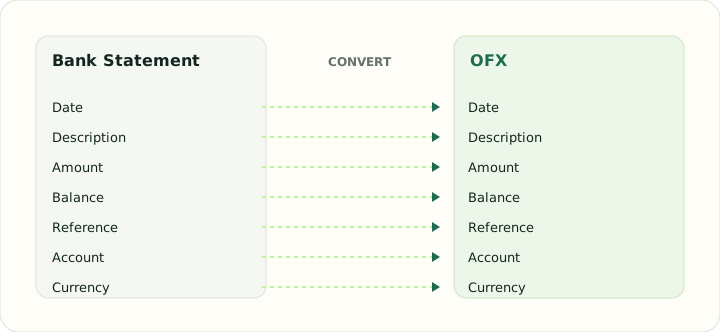
OFX expects structured identifiers and account details that a printed statement only shows in masked form. The table shows how each statement field is represented in the file.
| Field | In Bank Statement | In OFX |
|---|---|---|
| Date | Transaction and posting dates printed on each line | DTPOSTED in YYYYMMDD form |
| Description | Merchant or payee text, often wrapped over two lines | NAME and MEMO elements |
| Amount | Separate debit and credit columns, or a signed amount | Signed TRNAMT |
| Balance | Running balance after each line on most statements | LEDGERBAL block at statement close |
| Reference | Check numbers and bank references inside the description | FITID unique ID plus CHECKNUM |
| Account | Masked account number and statement period in the header | BANKACCTFROM with routing and account IDs |
| Currency | Statement currency in the header | CURDEF element |
Converting Bank Statement to OFX in practice
Rebuilding a machine-readable statement from a printed one
The supported PDF table does not provide verified institution or account-feed metadata. Before export, enter the actual account ID, currency, closing balance and balance date; bank feeds also require routing details. FITIDs are carried from the source when present or generated for the export, but import compatibility is not guaranteed.
Dates and signed amounts come directly from the supported table. The converter does not infer the statement period, debit/credit sections or reconcile the entered ledger balance against transactions.
After converting, check that:
- Required bank-feed metadata matches your account
- The date range and transaction signs match the original
- The supplied closing balance and date are accurate
How to convert Bank Statement to OFX in three steps
- 1Upload a supported PDFAdd a searchable transaction table using the documented columns and date layout.
- 2Enter feed metadataSupply the true account details, closing balance and date; values are never guessed.
- 3Download and importSave the OFX and import it into your software. The first import may ask you to confirm which account the file belongs to.
About Bank Statement and OFX
A PDF may omit routing and account details needed by a bank-feed file. Enter accurate values for your destination account; generated identifiers do not make the file an official bank download.
The export carries parsed dates and signed amounts plus user-supplied account metadata. It does not infer statement sections, dates, or closing balances from arbitrary PDFs.
Specifications and vendor help for Bank Statement and OFX: Financial Data Exchange, maintainer of the OFX standard
Questions about OFX conversion
Will my software accept the file?
Compatibility varies by institution and application. Test a small export and confirm account mapping before importing.
Are generated identifiers a duplicate guarantee?
No. Import software handles duplicates differently; check the destination register before repeating an import.
What account details do I need?
Account ID, currency, account type, balance and balance date; checking and savings exports also require routing and institution identifiers as applicable.
Can the file contain several months?
The export can include parsed rows from multiple uploaded files, but the supplied balance metadata applies to the resulting feed.