How CSV files work
CSV is widely supported but does not preserve formulas, styling, account metadata, or a universal financial schema. Delimiter, encoding, date, and decimal conventions must be checked.
The right conversion depends on whether the next step is human review, spreadsheet analysis, archival, or import into financial software. A converter should preserve transaction meaning rather than simply changing an extension.
How to open CSV
First identify the application that created the file and keep an untouched copy. Text-oriented formats can be inspected with a text editor, while spreadsheets and PDF documents require compatible viewers. Financial import formats should preferably be opened or imported by software that understands their account and transaction structures.
How to convert CSV
Choose an output based on the destination. CSV or Excel works well for review and analysis; QBO, QFX, OFX, QIF, or IIF may be required for accounting and personal-finance imports; PDF is best for a fixed readable report. Validate dates, signs, balances and identifiers before relying on a converted file.
CSV compared with related formats
CSV and Excel serve different parts of the financial-data workflow. The format name alone does not guarantee compatibility, so verify the destination application's supported versions and account types.
What a converter has to get right with CSV
CSV looks trivial — values separated by commas — but bank and accounting data breaks it in predictable ways. Descriptions contain commas and must be quoted. Dates arrive in the exporting system's locale, so 03/04/2026 is ambiguous without a declared convention. Amounts may be signed, split into Debit and Credit columns, or written as Money In and Money Out. Check numbers lose their leading zeros the moment a spreadsheet treats them as numbers. A converter that ignores any of these produces a file that opens but reconciles wrongly, which is why every tool on this site confirms the column layout and date order in a review step and writes ISO dates, plain numeric amounts and quoted text.
Choosing the direction
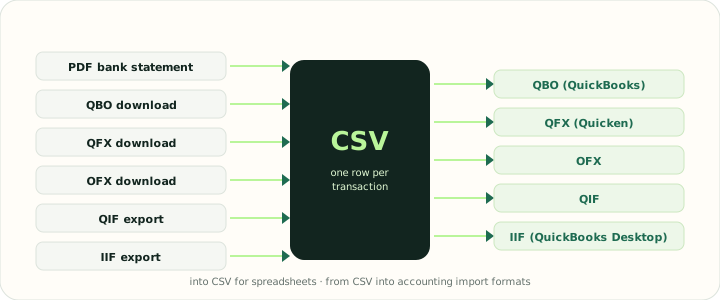
Converting a file into CSV is about making a structured file readable: a statement PDF, a QBO or QFX download or a QIF export becomes one transaction per row that any spreadsheet or import screen accepts. Converting from CSV is about adding what the table lacks: an account block, a currency, a transaction identifier per row and, for QuickBooks Desktop, balanced double-entry lines. The converters below are grouped by direction; pick the one whose destination matches the software you will import into, and keep the original file as the record of truth.
Reference: RFC 4180, the CSV specification
Supported CSV converters
Convert from or into CSV
Use an outgoing converter when CSV is your source. Use an incoming converter when another file must become CSV. Keeping those intents separate prevents accidental reversal of the workflow.