How QFX files work
QFX includes transaction records plus Quicken-specific institution and account metadata. Valid identifiers and supported account types matter during import.
The right conversion depends on whether the next step is human review, spreadsheet analysis, archival, or import into financial software. A converter should preserve transaction meaning rather than simply changing an extension.
How to open QFX
First identify the application that created the file and keep an untouched copy. Text-oriented formats can be inspected with a text editor, while spreadsheets and PDF documents require compatible viewers. Financial import formats should preferably be opened or imported by software that understands their account and transaction structures.
How to convert QFX
Choose an output based on the destination. CSV or Excel works well for review and analysis; QBO, QFX, OFX, QIF, or IIF may be required for accounting and personal-finance imports; PDF is best for a fixed readable report. Validate dates, signs, balances and identifiers before relying on a converted file.
QFX compared with related formats
QFX and OFX serve different parts of the financial-data workflow; QFX and QIF serve different parts of the financial-data workflow. The format name alone does not guarantee compatibility, so verify the destination application's supported versions and account types.
Inside a QFX file
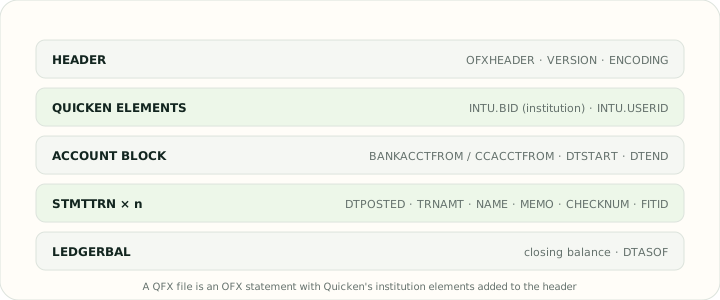
A QFX file opens with a short header that declares the OFX version and encoding, then the Quicken-specific INTU.BID institution identifier and, in some files, INTU.USERID. The body is an OFX statement: a BANKACCTFROM or CCACCTFROM block naming the account, a DTSTART and DTEND range, a list of STMTTRN blocks each carrying DTPOSTED, TRNAMT, NAME, MEMO, an optional CHECKNUM and a unique FITID, and finally a LEDGERBAL block with the closing balance. Older files use SGML-style unclosed tags; newer ones may be well-formed XML. Investment downloads add position and price sections that banking tools ignore.
Opening a QFX file, or converting it
Quicken opens QFX files directly through Web Connect and uses the FITID values to avoid importing a transaction twice. Outside Quicken the file is plain text, so a text editor shows the tags but not a usable table. If you need the transactions in a spreadsheet, a printable statement, QuickBooks or a QIF-only program, use one of the converters below: the QFX to CSV and QFX to Excel tools rebuild the transactions as rows, QFX to PDF produces a statement-style report, QFX to QBO swaps the Quicken header for the QuickBooks one, QFX to OFX strips the Quicken elements for specification-following software, and QFX to QIF writes legacy records with the identifier kept in the memo.
Reference: Quicken support
Supported QFX converters
Convert from or into QFX
Use an outgoing converter when QFX is your source. Use an incoming converter when another file must become QFX. Keeping those intents separate prevents accidental reversal of the workflow.